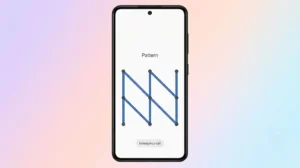
A pattern lock is one of the most popular ways to secure an Android smartphone. It’s quick, convenient, and doesn’t require typing a password every time you unlock your device. However, many users unknowingly choose patterns that are too simple, making them easy to predict.
If you want to keep your personal data safe, creating a stronger pattern lock is one of the easiest security improvements you can make. Here’s how to choose a pattern that offers better protection without making it difficult to remember.
Why a Strong Pattern Lock Is Important
Your smartphone contains much more than contacts and photos. Banking apps, email accounts, private messages, and saved passwords are all protected by your screen lock.
A weak unlock pattern increases the risk of unauthorized access if your phone is lost, stolen, or borrowed by someone else.
Don’t Choose Obvious Patterns
The most common mistake is selecting a pattern that forms a familiar shape.
Avoid patterns that look like:
- A straight vertical or horizontal line
- The letter L
- The letter Z
- A square or rectangle
- Simple corner-to-corner movements
These combinations are often the first ones people try.
Use More Connection Points
Android allows you to connect up to nine dots.
Instead of using only four points, try using six or more. A longer pattern creates more possible combinations, making it much harder to guess.
Change Direction Frequently
A secure pattern shouldn’t move in only one direction.
Try creating a design that:
- Moves horizontally and vertically
- Crosses over previous lines
- Changes direction multiple times
This adds complexity without making the pattern impossible to remember.
Start Somewhere Unexpected
Many users instinctively begin from the upper-left corner.
For extra security, begin from:
- The center
- Bottom-right
- Bottom-left
- Middle row
Changing the starting point alone makes your pattern less predictable.
Hide the Pattern Trail
If your phone displays visible lines while drawing the pattern, someone nearby could easily observe it.
To improve security:
- Open Settings.
- Go to Security & Privacy.
- Tap Screen Lock.
- Disable Visible Pattern if your phone supports it.
Without the trail, your unlock method becomes much harder to copy.
Clean Your Screen Regularly
Fingerprint smudges can sometimes reveal the direction of your unlock pattern.
Wiping the display occasionally helps reduce visible traces left behind after unlocking.
Add Biometric Security
A strong pattern becomes even more secure when paired with biometric authentication.
Most Android phones support:
- Fingerprint Unlock
- Face Unlock
These options provide faster access while keeping the pattern available as a backup authentication method.
Update Your Pattern Occasionally
If you’ve used the same unlock pattern for years, consider changing it.
Updating your pattern is a good idea when:
- Someone has seen you unlock your phone.
- You recently lost your device.
- You shared your phone with another person.
Regular changes reduce the chance of someone remembering your previous unlock method.
Frequently Asked Questions
Is a long pattern more secure?
Yes. Using more dots generally increases the number of possible combinations and improves security.
Should I use a pattern or a PIN?
Both are secure when used properly. A complex pattern offers convenience, while a longer PIN usually provides slightly stronger protection.
Can fingerprint unlock replace my pattern?
No. Android still requires your pattern, PIN, or password after restarting the device or in certain security situations.
Does Android limit wrong attempts?
Yes. Multiple incorrect attempts usually trigger temporary lockouts, making repeated guessing much more difficult.
Final Thoughts
A pattern lock is only effective when it’s designed thoughtfully. Avoid predictable shapes, connect more dots, change directions, and disable visible pattern lines whenever possible. Combining these simple habits with fingerprint or face unlock gives your Android phone much stronger protection against unauthorized access.
Spending just a few minutes improving your screen lock today can help keep your personal information secure for years to come.