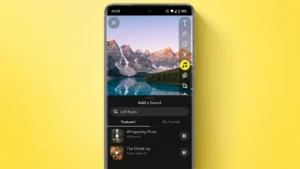
Music can make your Snapchat content more engaging, entertaining, and expressive. Whether you’re sharing a memorable moment, posting a travel clip, or creating a fun video with friends, adding the right song can instantly improve the overall experience.
Snapchat includes built-in music features that allow users to add popular songs directly to their Snaps and Stories. In addition, users can create custom sounds, use original audio, and personalize content in different ways.
If you’re new to the feature, here’s everything you need to know about adding music to Snapchat.
Why Add Music to Snapchat?
Music helps bring photos and videos to life. A well-chosen song can enhance emotions, make content more entertaining, and help your Stories stand out.
Some common reasons people add music to Snapchat include:
- Creating more engaging Stories
- Sharing favorite songs with friends
- Matching music with travel or lifestyle content
- Making videos more entertaining
- Adding personality to Snaps
The feature has become especially popular among content creators and everyday users who want to make their posts more memorable.
How to Add Music to a Snapchat Snap
Adding music to a Snap is a simple process.
Step 1: Open Snapchat
Launch the Snapchat app on your Android or iPhone device.
Step 2: Capture a Photo or Video
Take a new photo or record a video using the Snapchat camera.
Step 3: Tap the Music Icon
After capturing your content, look for the music note icon on the editing screen.
Step 4: Choose a Song
Snapchat provides access to a large music library. You can browse trending tracks, search for specific songs, or explore different genres.
Step 5: Select the Desired Section
Choose the portion of the song you want to use in your Snap. Snapchat allows users to select a specific segment of the track.
Step 6: Share Your Snap
Once you’re satisfied with the result, send it to friends or add it to your Story.
How to Add Music to Snapchat Stories
The process is nearly identical for Stories.
- Create a photo or video.
- Tap the music icon.
- Select a song.
- Adjust the song clip.
- Add the Snap to your Story.
Anyone viewing the Story can see the song information and listen to the selected music segment.
What Are Snapchat Sounds?
Snapchat also offers a feature called Sounds, which allows users to create custom audio clips.
With Sounds, you can:
- Record your own voice
- Create original audio
- Save custom sounds
- Reuse audio in future Snaps
- Share sounds with friends
This feature is useful for creators who want unique audio instead of using songs from Snapchat’s music catalog.
How to Create Custom Sounds on Snapchat
Creating your own sound takes only a few steps.
Open Snapchat
Launch the app and tap the music icon.
Select “Create Sound”
Choose the Create Sound option from the available menu.
Record Audio
Record your voice, background sound, or any custom audio clip.
Save the Sound
Give the sound a name and save it to your Snapchat account.
Use It in Future Snaps
Your custom sound can now be added to future photos and videos.
Tips for Choosing the Right Music
Not every song fits every Snap. Choosing music that matches the mood of your content can create a better viewing experience.
Consider:
- Upbeat songs for celebrations
- Relaxing music for travel content
- Emotional tracks for special memories
- Trending songs for increased engagement
- Instrumental music for cinematic videos
A carefully selected soundtrack often makes content more appealing and memorable.
Common Issues When Adding Music
Sometimes users may not see the music feature immediately.
Possible reasons include:
- Outdated Snapchat version
- Regional restrictions
- Temporary server issues
- App permissions problems
Updating Snapchat to the latest version usually resolves most issues.
Is Snapchat Music Free?
Yes. Snapchat’s built-in music feature is available at no additional cost for supported users. You can browse and add songs directly from the app without needing a separate music subscription.
However, song availability may vary depending on your location and licensing agreements.
Final Thoughts
Adding music to Snapchat is one of the easiest ways to make your content more engaging and enjoyable. Whether you’re using popular songs from Snapchat’s music library or creating your own custom sounds, the feature provides plenty of creative possibilities.
With just a few taps, you can transform ordinary photos and videos into more expressive Stories that capture attention and better reflect your personality.
2 thoughts on “How to Add Music to Snapchat Stories, Snaps, and Videos Easily”