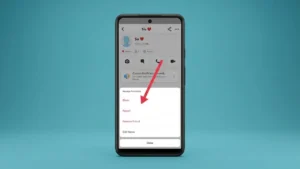
Snapchat makes it easy to stay connected with friends, but there may be times when you no longer want someone to contact you. Whether you’re dealing with unwanted messages, spam accounts, or simply want more control over your privacy, blocking someone on Snapchat is one of the most effective solutions.
In this guide, you’ll learn exactly how to block someone on Snapchat, what happens after you block them, how blocking differs from removing or reporting someone, and answers to the most common questions users have.
Also read: How to Delete Your Instagram Account Permanently (And When You Should Deactivate It Instead)
What Happens When You Block Someone on Snapchat?
Blocking someone on Snapchat completely prevents them from interacting with your account.
Once you block a person:
- They can no longer send you Snaps or chat messages.
- They won’t be able to view your public profile or Story (depending on your privacy settings).
- They are removed from your Friends list.
- They can’t search for your account using your username in most cases.
- You won’t receive notifications from them.
Blocking is one of Snapchat’s strongest privacy tools and can be reversed later if you change your mind.
How to Block Someone on Snapchat
Follow these simple steps:
Method 1: Block From Chat
- Open Snapchat.
- Swipe right to open the Chat screen.
- Tap and hold the conversation with the person.
- Select Manage Friendship or Manage (depending on your app version).
- Tap Block.
- Confirm your choice.
The user will immediately be blocked.
Method 2: Block From Their Profile
- Open Snapchat.
- Search for the person’s username.
- Open their profile.
- Tap the three-dot menu in the top-right corner.
- Select Manage Friendship.
- Tap Block.
- Confirm.
What Happens After You Block Someone?
Many users wonder whether the other person will know they have been blocked.
Here’s what happens:
| Feature | After Blocking |
|---|---|
| Can send messages | No |
| Can send Snaps | No |
| Can view your profile | Usually No |
| Can find your account | Limited or No |
| Removed from Friends list | Yes |
| Notification sent | No |
Snapchat does not send a notification saying you blocked someone.
Block vs Remove Friend vs Report
Many people confuse these options. Here’s how they’re different:
| Feature | Block | Remove Friend | Report |
|---|---|---|---|
| Removes from Friends | Yes | Yes | Optional |
| Stops all messages | Yes | No (depending on privacy settings) | Not necessarily |
| Prevents searching | Mostly Yes | No | No |
| Reports policy violation | No | No | Yes |
| Best for harassment | Yes | No | Yes |
When Should You Block Someone?
Blocking may be the right option if someone is:
- Sending unwanted messages.
- Harassing or threatening you.
- Spamming your account.
- Creating fake accounts to contact you.
- Making you uncomfortable.
- Invading your privacy.
If someone is violating Snapchat’s Community Guidelines, consider reporting them before or after blocking.
Can a Blocked Person Still See Old Messages?
In most cases:
- Previous conversations may disappear from both users’ chat lists.
- Saved messages may remain visible depending on how they were saved before the block.
- The blocked user cannot continue the conversation.
The exact behavior may vary slightly depending on the Snapchat version and both users’ settings.
Can You Unblock Someone Later?
Yes.
If you decide to reconnect with someone, you can unblock them at any time.
To unblock someone:
- Open Snapchat.
- Tap your profile icon.
- Open Settings.
- Scroll to Blocked Users.
- Find the person’s username.
- Tap the X or Unblock option beside their name.
- Confirm.
Keep in mind that unblocking someone does not automatically restore your friendship. You may need to send a new friend request.
Will They Know I Blocked Them?
Snapchat does not notify users when they are blocked.
However, they may realize it if:
- They can no longer find your account.
- Messages stop delivering.
- Your profile disappears.
- Previous conversations are no longer accessible.
How to Improve Your Privacy on Snapchat
Blocking is only one part of protecting your account. You can also improve your privacy by adjusting your settings.
Consider these options:
- Set Contact Me to Friends.
- Limit who can view your Story.
- Enable Two-Factor Authentication.
- Review your Friends list regularly.
- Avoid accepting requests from unknown accounts.
- Keep your Snapchat app updated.
These settings can help reduce unwanted interactions.
Advantages of Blocking Someone
- Stops unwanted messages instantly.
- Protects your privacy.
- Removes unwanted contacts.
- Prevents further communication.
- Easy to unblock later if needed.
- No notification is sent to the blocked user.
Things to Consider Before Blocking
- The person is removed from your Friends list.
- You’ll need to add them again if you reconnect later.
- Blocking may not remove every previously saved chat.
- Reporting is still recommended for abusive or harmful behavior.
Frequently Asked Questions
Can someone tell if I blocked them on Snapchat?
No. Snapchat doesn’t notify users when they are blocked. They may only notice indirectly if they can no longer find or contact your account.
Does blocking delete chats?
Current conversations usually become inaccessible, but previously saved messages may still appear depending on the situation and app version.
Can I unblock someone later?
Yes. You can unblock anyone from the Blocked Users section in Snapchat Settings.
Does blocking remove someone from my Friends list?
Yes. Blocking automatically removes the person from your Friends list.
Should I block or report someone?
If someone is simply bothering you, blocking is usually enough. If they’re harassing you, impersonating someone, sending scams, or violating Snapchat’s policies, reporting the account is also recommended.
Also read: How to Add Music to Snapchat Stories, Snaps, and Videos Easily
Final Thoughts
Knowing how to block someone on Snapchat is an important part of managing your online privacy. Whether you’re avoiding spam, ending unwanted conversations, or protecting yourself from harassment, Snapchat’s blocking feature gives you greater control over who can interact with you.
Before blocking someone, consider whether removing them as a friend or adjusting your privacy settings might solve the issue. However, if someone makes you feel unsafe or repeatedly contacts you against your wishes, blocking them is a simple and effective way to protect your Snapchat experience.