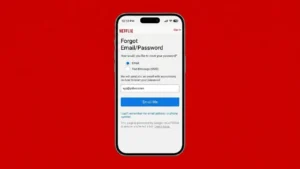
Forgetting your Netflix password can be frustrating, especially when you’re ready to watch your favorite movie or TV show. Fortunately, Netflix provides several secure ways to reset your password and regain access to your account. Whether you’ve forgotten your login details, suspect someone else has accessed your account, or simply want to create a stronger password, the process is quick and straightforward.
In this guide, you’ll learn how to reset your Netflix password, recover your account, troubleshoot common login issues, and secure your account from unauthorized access.
When Should You Reset Your Netflix Password?
You may need to reset your password if:
- You forgot your current password.
- You can’t sign in to your Netflix account.
- You received a suspicious login alert.
- Someone else may know your password.
- You want to improve your account security.
Resetting your password is one of the easiest ways to protect your Netflix account and prevent unauthorized access.
How to Reset Your Netflix Password
Follow these simple steps to create a new password.
Method 1: Reset Using Your Email Address
This is the fastest and most commonly used method.
- Open the Netflix website or app.
- Select Sign In.
- Click or tap Forgot Password?
- Choose Email as your recovery option.
- Enter the email address associated with your Netflix account.
- Check your inbox for the password reset email.
- Open the email and click the reset link.
- Create a new, strong password.
- Save the changes and sign in using your new password.
Method 2: Reset Using Your Phone Number
If you’ve linked a phone number to your account:
- Go to the Netflix password recovery page.
- Select Text Message (SMS).
- Enter your registered mobile number.
- You’ll receive a verification code or reset link.
- Follow the instructions to create a new password.
Method 3: Recover Using Billing Information
If you no longer have access to your email or phone number, Netflix may allow you to verify your identity using billing details.
You may be asked for:
- Your name
- Payment method information
- Billing details associated with your subscription
Once your identity is verified, you can update your account information and reset your password.
What to Do If You Don’t Receive the Password Reset Email
If the reset email doesn’t arrive:
- Check your Spam or Junk folder.
- Make sure you entered the correct email address.
- Search your inbox for “Netflix.”
- Wait a few minutes and request another reset email.
- Add Netflix to your email safe sender list if necessary.
What If the Password Reset Link Doesn’t Work?
Password reset links expire after a certain period for security reasons.
If the link no longer works:
- Request a new password reset email.
- Open only the latest reset email.
- Complete the process before the link expires.
How to Create a Strong Netflix Password
A secure password helps protect your account from unauthorized access.
A good password should:
- Be at least 12 characters long.
- Include uppercase and lowercase letters.
- Contain numbers.
- Include special characters.
- Be different from passwords used on other websites.
Avoid using easily guessed information such as:
- Your name
- Birthdate
- Phone number
- Simple combinations like 123456 or password
How to Secure Your Netflix Account After Resetting the Password
Once you’ve changed your password, take a few extra steps to improve your account security.
Sign Out of All Devices
If you think someone else was using your account:
- Open Account Settings.
- Select Sign out of all devices.
- Wait a few minutes.
- Sign back in only on your trusted devices.
Review Your Devices
Check which devices have recently accessed your account and remove any you don’t recognize.
Update Recovery Information
Make sure your recovery email address and phone number are correct so you can easily recover your account in the future.
Common Reasons You Can’t Access Your Netflix Account
| Problem | Possible Solution |
|---|---|
| Forgot password | Use the password reset option |
| Forgot email address | Try your billing information or contact Netflix Support |
| Didn’t receive reset email | Check Spam folder and request another email |
| Reset link expired | Generate a new reset link |
| Account hacked | Reset your password immediately and sign out of all devices |
Tips to Keep Your Netflix Account Safe
- Never share your password with unknown people.
- Use a unique password for Netflix.
- Update your password regularly.
- Keep your recovery email and phone number up to date.
- Watch for suspicious login notifications.
Frequently Asked Questions
Can I reset my Netflix password without my email?
Yes. If your phone number is linked to your account, you can reset your password using SMS verification. In some cases, billing information may also help recover your account.
Will resetting my password log everyone out?
Not automatically. If you want to remove access from other users or unknown devices, use the Sign out of all devices option after changing your password.
How long does the password reset link remain valid?
Netflix password reset links expire after a limited time for security reasons. If your link has expired, simply request a new one.
Can I recover my account if I no longer have access to my email?
Yes. Depending on your account information, Netflix may allow recovery using your phone number or billing details.
Final Thoughts
Forgetting your Netflix password doesn’t have to be a major problem. Netflix offers several secure recovery options through your email address, phone number, or billing information, making it easy to regain access to your account.
After resetting your password, take a few extra minutes to review your account security. Signing out of unknown devices, updating your recovery information, and using a strong, unique password can help keep your Netflix account protected and reduce the risk of unauthorized access in the future.