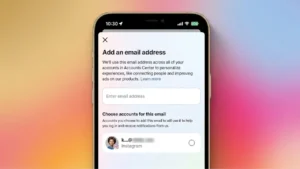
Your email address plays a major role in protecting your Instagram account. It’s used for password recovery, login verification, security alerts, and identity confirmation. If you no longer use your current email, or you suspect it has been compromised, updating it should be one of your top priorities.
Fortunately, Instagram allows you to change your email address in just a few minutes. In this guide, you’ll learn how to update your Instagram email, why it’s important, and some security tips to help keep your account safe.
Why You Should Update Your Instagram Email
Many people create Instagram accounts using an email address they rarely check later. Over time, that email account may become inactive or even vulnerable to hackers.
Updating your email address helps you:
- Recover your account more easily if you forget your password.
- Receive important security notifications.
- Protect your account from unauthorized access.
- Keep your contact information up to date.
- Improve overall account security.
If you’ve recently changed your primary email or switched providers, it’s a good idea to update it on Instagram as well.
How to Change Your Email on Instagram
Changing your email address is simple and works on both Android and iPhone.
Step 1: Open Instagram
Launch the Instagram app and sign in to your account.
Step 2: Visit Your Profile
Tap your profile picture in the bottom-right corner to open your profile.
Step 3: Edit Your Profile
Tap Edit Profile.
On some versions of Instagram, you may see Personal Information Settings or Account Center instead.
Step 4: Open Personal Information
Tap Personal Information or navigate to:
Account Center → Personal Details → Contact Info
Step 5: Update Your Email Address
Select your current email address and enter your new one.
Make sure you enter the correct email because Instagram will use it for future security notifications.
Step 6: Verify Your New Email
Instagram will send a verification email to your new address.
Open your inbox and click the verification link to confirm the change.
Once verified, your new email becomes the primary email connected to your Instagram account.
What If You Don’t Receive the Verification Email?
If the email doesn’t arrive within a few minutes:
- Check your Spam or Junk folder.
- Make sure you entered the email address correctly.
- Wait a few minutes and request another verification email.
- Ensure your inbox isn’t full.
- Try using a different email provider if necessary.
Can You Change Your Instagram Email Without Logging In?
No.
For security reasons, you must be logged into your Instagram account before changing your email address.
If you can’t log in, use the Forgot Password option to recover your account first.
What Happens After Changing Your Email?
After updating your email:
- Your old email will no longer receive Instagram notifications.
- Password reset emails will be sent to your new address.
- Security alerts will go to the updated email.
- Login verification codes will also be delivered there when required.
Additional Ways to Protect Your Instagram Account
Changing your email is only one part of keeping your account secure. Here are a few additional steps you should take.
Enable Two-Factor Authentication
Two-factor authentication (2FA) adds an extra layer of protection by requiring a verification code whenever someone tries to log in.
You can enable it from:
Settings → Accounts Center → Password and Security → Two-Factor Authentication
Use a Strong Password
Choose a password that includes:
- Uppercase letters
- Lowercase letters
- Numbers
- Special characters
Avoid using birthdays or simple words.
Keep Your Email Secure
Since your email protects your Instagram account, make sure it also has:
- A strong password
- Two-factor authentication
- Recovery options enabled
Review Login Activity
Instagram lets you see where your account is currently logged in.
Go to:
Settings → Accounts Center → Password and Security → Where You’re Logged In
If you notice an unfamiliar device, log it out immediately.
Common Reasons to Change Your Instagram Email
Many users update their email because:
- They switched to a new email provider.
- Their old email was hacked.
- They lost access to the previous email account.
- They want better security.
- They use a professional email for business or creator accounts.
Frequently Asked Questions
Will changing my email delete my Instagram account?
No. Updating your email does not affect your photos, followers, messages, or account data.
Can I use the same email on multiple Instagram accounts?
Yes. Instagram allows multiple accounts to use the same email in many cases, although using separate emails can make account management easier.
How long does it take for the email change to update?
Usually, the change becomes active immediately after you verify the new email address.
Final Thoughts
Your email address is one of the most important security tools connected to your Instagram account. Keeping it updated ensures you can recover your account quickly, receive important security alerts, and reduce the risk of unauthorized access.
The entire process only takes a few minutes, but it can make a significant difference in protecting your personal information. If you haven’t updated your Instagram email in a long time, now is a great time to review your account settings and make sure everything is current.