WhatsApp has become one of the most popular messaging apps in the world, allowing users to send messages, make voice calls, and enjoy high-quality video calls for free. However, as its popularity has grown, so has the number of spam and scam calls from unknown numbers.
Receiving random WhatsApp calls can be frustrating, especially if they interrupt your work, sleep, or personal time. Fortunately, WhatsApp includes a built-in feature that allows you to silence calls from numbers that aren’t saved in your contacts.
In this guide, you’ll learn how to enable this feature, why it’s useful, and what happens after you turn it on.
Why Are You Receiving Unknown WhatsApp Calls?
There are several reasons why you might receive calls from unfamiliar numbers:
- Spam callers promoting products or services
- Scam attempts pretending to be customer support
- Fraudsters trying to steal personal information
- Random wrong-number calls
- International scam calls
Many scammers use WhatsApp because it allows them to contact people from anywhere in the world using only a phone number.
What Is the “Silence Unknown Callers” Feature?
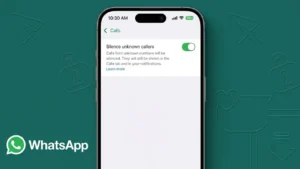
WhatsApp introduced Silence Unknown Callers to help users reduce unwanted interruptions without completely blocking unknown numbers.
When enabled:
- Calls from unknown numbers won’t ring on your phone.
- The calls will still appear in your Calls tab.
- You’ll receive a missed call notification.
- You can choose whether to return the call later.
This feature helps protect users from spam while ensuring important calls aren’t completely hidden.
How to Silence Unknown Calls on WhatsApp
Enabling this feature only takes a few seconds.
On Android
- Open WhatsApp.
- Tap the three-dot menu in the top-right corner.
- Select Settings.
- Tap Privacy.
- Scroll down and select Calls.
- Turn on Silence Unknown Callers.
On iPhone
- Open WhatsApp.
- Tap Settings.
- Select Privacy.
- Tap Calls.
- Enable Silence Unknown Callers.
Once activated, unknown callers will no longer disturb you with ringing notifications.
What Happens After Enabling the Feature?
Many users think WhatsApp blocks unknown callers completely, but that’s not how it works.
Instead:
- The phone won’t ring.
- The call won’t interrupt your activity.
- The call is recorded in your call history.
- You can still view the caller’s number.
- You can call back if the call turns out to be important.
This balance helps reduce spam without causing you to miss genuine calls.
Benefits of Silencing Unknown WhatsApp Calls
Better Privacy
Unknown callers cannot continuously disturb you with repeated calls.
Fewer Scam Attempts
Many fraudulent callers rely on users answering immediately. Silencing these calls reduces the chances of interacting with scammers.
Less Distraction
Whether you’re working, studying, or relaxing, you won’t be interrupted by unnecessary calls.
Improved Security
Suspicious international numbers and spam callers become much easier to ignore.
Peace of Mind
Knowing that unknown calls won’t constantly ring makes using WhatsApp much more comfortable.
Additional Tips to Stay Safe on WhatsApp
Silencing unknown callers is a great first step, but you can further improve your privacy with these tips:
Enable Two-Step Verification
This adds an extra layer of security to your WhatsApp account.
Hide Your Profile Photo
Limit who can see your profile picture by changing its privacy settings.
Restrict Your Last Seen
Choose whether everyone, your contacts, or nobody can see your online activity.
Block Suspicious Numbers
If someone repeatedly contacts you, block their number immediately.
Never Share Verification Codes
WhatsApp will never ask you to share your six-digit verification code with anyone.
Can You Still Receive Calls From Saved Contacts?
Yes.
The Silence Unknown Callers feature only affects numbers that are not saved in your contacts.
Friends, family members, colleagues, and other saved contacts will continue calling you normally.
Does This Feature Block Unknown Callers?
No.
It only silences the call.
The caller can still attempt to contact you, but your phone won’t ring. The call will simply appear as a missed call inside WhatsApp.
Who Should Use This Feature?
This setting is especially useful for:
- Business owners receiving spam calls
- Students
- Remote workers
- Content creators
- Professionals
- Anyone frequently targeted by unknown WhatsApp numbers
Final Thoughts
Spam calls on WhatsApp have become increasingly common, but you don’t have to deal with constant interruptions. The Silence Unknown Callers feature is a simple yet effective privacy tool that allows you to avoid unwanted calls while still keeping track of them in your call history.
If you’re tired of random numbers disturbing your day, enabling this setting takes less than a minute and can significantly improve your overall WhatsApp experience. It’s a smart privacy feature that every WhatsApp user should consider turning on.